Multi-Segment Trajectory Blending#
This planner generates a continuous trajectory with smooth velocity and acceleration between multiple planned waypoints.
If a specified blend_radius (in meters) is greater than zero, the corresponding trajectory is blended with the following target so that the robot does not stop at the current target. When the TCP is closer to the target than the specified blend_radius, it can proceed toward the next target. When it leaves the sphere surrounding the current target, the robot returns to the trajectory it would have followed without blending.
This is illustrated below:
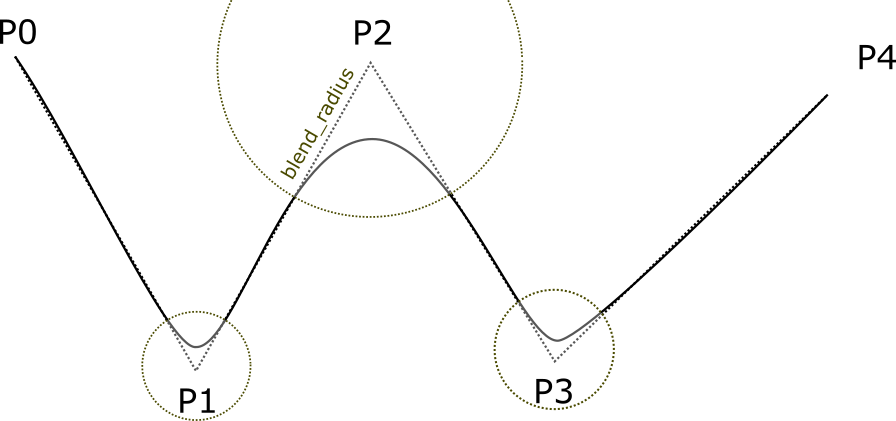
Trajectory blending has limitations. Only the first target can have a start state. Subsequent trajectories begin at the preceding target. In addition, two consecutive blend_radius spheres must not overlap.
blend_radius(i) + blend_radius(i+1)must be less than the distance between the targets.
When using trajectory blending, configure the following parameters in options:
velocity_scaling_factor: Scaling factor for the maximum joint velocityacceleration_scaling_factor: Scaling factor for the maximum joint acceleration/decelerationsampling_time: Sampling interval (in seconds)allow_planning_time: Maximum allowed planning timeallow_blend_fail: Allows blending failure. When enabled, a failed blend falls back toblend_radius= 0.
Note: Trajectory blending creates a smooth transition at the junction between segments (equivalent to replacing a short portion around the corner with a smooth curve). This allows the trajectory to deviate slightly near a waypoint in exchange for continuous velocity/acceleration and shorter execution time. It fits and resamples path segments; unlike strict time parameterization, the output waypoints may deviate from the original trajectory within a certain tolerance.
Note: Modification of the trajectory blending radius (
blend_radius) is not currently available.