π₀.₅ Model#
Model Introduction#
π₀.₅ is an upgraded vision-language-action (VLA) model developed by the Physical Intelligence team based on π₀. It uses Knowledge Insulation training to improve generalization to open-world tasks while retaining the Flow Matching action-generation architecture.
OpenPI Training Environment Configuration#
Caution
- Training environment: Ubuntu 22.04 / 24.04
- Inference environment: Ubuntu 24.04 only
Installing FFmpeg#

Installing Environment Dependencies#
Contact technical support for the compatible openpi archive. Extract it, then enter the directory in a terminal:
Install the basic dependencies:sudo apt install python3-venv clang
python3 -m pip install --user pipx
pipx install uv -i https://mirrors.aliyun.com/pypi/simple
# Configuring a terminal proxy is recommended (adjust it to the actual proxy address); otherwise, network issues can easily cause installation to fail
# export {HTTP_PROXY,HTTPS_PROXY,ALL_PROXY,http_proxy,https_proxy,all_proxy}=http://127.0.0.1:7890
# Because uv compiles certain packages, do not use a Conda environment
GIT_LFS_SKIP_SMUDGE=1 uv sync
GIT_LFS_SKIP_SMUDGE=1 uv pip install -e .
# The following section is required only for local inference
sudo apt-get install ./airbot-configure_5.1.6-1_all.deb
sudo apt-get install -y libturbojpeg gcc python3-dev v4l-utils
# OpenPI officially requires Python 3.11+; use the Python 3.12 version included with Ubuntu 24.04 to install the hardware-driver package
# Hardware-driver package download: https://github.com/DISCOVER-Robotics/AIRBOT-Play-Hardware/releases
uv pip install airbot_hardware_py-<version>.whl
💡 Tip
Dependency check:
After installation, check that
linuxpyandpyturbojpegwere installed correctly:If they are not installed, run:
MuJoCo compilation issue: If a compilation issue similar to the following occurs during installation, install MuJoCo version 3.3.7:
MiB/42.45 MiB  × Failed to build `mujoco==2.3.7`
  ├─▶ The build backend returned an error
  ╰─▶ Call to `setuptools.build_meta:__legacy__.build_wheel` failed (exit status: 1)

      [stdout]
      running bdist_wheel
      running build
      running build_py
      creating build/lib.linux-x86_64-cpython-312/mujoco
      copying mujoco/viewer_test.py -> build/lib.linux-x86_64-cpython-312/mujoco
      copying mujoco/render_test.py -> build/lib.linux-x86_64-cpython-312/mujoco
      copying mujoco/gl_context.py -> build/lib.linux-x86_64-cpython-312/mujoco
      copying mujoco/viewer.py -> build/lib.linux-x86_64-cpython-312/mujoco
      copying mujoco/rollout_test.py -> build/lib.linux-x86_64-cpython-312/mujoco
      copying mujoco/__init__.py -> build/lib.lin
Caution
- All installations involving
uvmust be performed in the OpenPI project root (the path containing the.venvdirectory). Otherwise, packages cannot be installed into the environment. - After a library version is changed,
uv runautomatically reverts to the version inuv.lock. Useexport UV_NO_SYNC=1to temporarily disable synchronization, or back up the current uv.lock file, rename it to uv.lock.backup, and runuv lock --upgradeto update it.
GPU Requirements#
To train the π₀.₅ model, your NVIDIA GPU must meet at least the specifications below. These estimates are based on single-GPU training. You can also use model parallelism (FSDP) across multiple GPUs to distribute video-memory usage (set FSDP_DEVICES in the training configuration). Note: The current training script does not support multi-node training.
| Training Mode | Video Memory Required | Recommended GPU |
|---|---|---|
| Inference | ≥ 8 GB | RTX 3090 / 4090 |
| Fine-tuning (LoRA) | ≥ 22.5 GB | RTX 3090 / 4090 |
| Full-parameter fine-tuning (Full) | ≥ 70 GB | A100 (80GB) / H100 |
Important Notes#
- Configuration reference: The table above shows reference configurations provided by Physical Intelligence.
- Fine-tuning recommendation: When the amount of data is small, LoRA fine-tuning is recommended because it saves resources while still producing good results.
- Inference compatibility:
- LoRA-fine-tuned models support inference on laptops with 8 GB of video memory.
- Full-parameter-fine-tuned models cannot be loaded on devices with 8 GB of video memory (the program usually crashes).
- Troubleshooting resource issues:
- If a LoRA model crashes while loading, check whether system resources are sufficient.
- Try closing unnecessary programs to free resources.
- Using multiple GPUs:
- OpenPI uses all available GPUs for training by default.
- To restrict usage, specify the GPU before training, for example:
export CUDA_VISIBLE_DEVICES=1
Fine-Tuning#
Configuring Training Parameters#
# NOTE: This is Airbot's example configuration file. First create a data directory, move this file into it, and rename it config.py.

# Task name: Must match the directory name in which data collected by lerobot_play is stored
TASK_NAME = "你的任务名称"

# Robot type: 1-1 for a single arm; ptk for dual arms
ROBOT_TYPE = "ptk"

# ==================== Framework-reserved configuration (do not modify) ====================
# The following three items are reserved for framework interfaces. They are not called in the current version but must remain present.
FOLDERS = ["fold_clothes"]

STATE_TOPICS = [
    "/left/follow/arm/joint_state/position",
    "/left/follow/eef/joint_state/position",
    "/right/follow/arm/joint_state/position",
    "/right/follow/eef/joint_state/position",
]

ACTION_TOPICS = [
    "/left/lead/arm/joint_state/position",
    "/left/lead/eef/joint_state/position",
    "/right/lead/arm/joint_state/position",
    "/right/lead/eef/joint_state/position",
]

# ==================== Configuration actually used ====================
# The following configuration items are used. Adjust them to the actual setup.
# Camera configuration: keys correspond to OpenPI's default camera names; values correspond to camera names used during data collection
# Note: Names must use the format "observation.images.xxx" and must match the camera names in the data-collection configuration file
CAMERA_TOPICS = {
    # Key names may only be selected from ["base_0_rgb", "left_wrist_0_rgb", "right_wrist_0_rgb"], with no more than 3 keys
    "base_0_rgb": "observation.images.env_camera",
    "left_wrist_0_rgb": "observation.images.left_hand_camera",
    "right_wrist_0_rgb": "observation.images.right_hand_camera",
}

FPS = 20

# OpenPI requires all actions except those of end effectors to be converted to delta actions
# DELTA_ACTION_MASK is a tuple. For example, (6, -1) means the first 6 joints are converted to delta actions, while the final joint (the end effector) is not converted
DELTA_ACTION_MASK = (6, -1, 6, -1)

# ==================== Optional configuration ====================

# Model configuration
BASE_MODEL = "pi05"       # Currently only pi0 and pi05 are supported
USING_LORA = True         # Whether to use LoRA fine-tuning
OVER_WRITE = False        # Whether to overwrite an existing checkpoint directory (set to False to continue training)
EXP_NAME = "pi05_fold_t"  # Directory name in which checkpoints are saved
BATCH_SIZE = 32           # Batch size during training
NUM_WORKERS = 2           # Number of data-loading processes
NUM_TRAIN_STEPS = 30_000  # Number of training steps
LOG_INTERVAL = 100        # Interval in steps between log output
SAVE_INTERVAL = 2500      # Interval in steps between checkpoint saves
KEEP_PERIOD = 10000       # Step interval corresponding to the checkpoints that must ultimately be retained
RESUME = True             # Whether to resume training from the last checkpoint
LOG_METHOD = "wandb"      # Logging method: "wandb", "mlflow", or "none"
FSDP_DEVICES = 1          # Keep the default; adjust when the entire model cannot be loaded on one GPU
DEFAULT_PROMPT = "fold the t-shirt"  # Default prompt; set to None to use the task description in the dataset
Computing Dataset Statistics#
Dataset statistics are required for normalization during training. Run the following command to compute them:
CUDA_VISIBLE_DEVICES=0 uv run examples/airbot/compute_norm_stats.py --config-path data/yout_task/config.py
assets directory. If no statistics data is generated, training reports an error and terminates automatically.
Model Training#
Run the training command:
XLA_PYTHON_CLIENT_MEM_FRACTION=0.9 uv run examples/airbot/airbot_train.py --config-path data/your_task/
Parameter Descriptions#
XLA_PYTHON_CLIENT_MEM_FRACTION=0.9: Configures JAX to use at most 90% of GPU video memory (the default is only 75%).--config-path: Configuration-file path or containing directory (points to the directory containingconfig.py).
Common Errors and Solutions#
Orbax Checkpoint Error
Solution: Open openpi/.venv/lib/python3.12/site-packages/orbax/checkpoint/future.py and manually add:
- Cause: The
numpydanticandpydanticversions are incompatible. The default dependencies forlerobot==0.4.0may conflict with the official OpenPI repository. - Solution: Use the dependency versions in the official OpenPI configuration.
libtorchcodec Failed to Load
RuntimeError: Could not load libtorchcodec.
Likely causes:
1. FFmpeg is not properly installed in your environment. We support
   versions 4, 5, 6 and 7.
2. The PyTorch version (2.7.1+cu126) is not compatible with
   this version of TorchCodec. Refer to the version compatibility
   table:
   https://github.com/pytorch/torchcodec?tab=readme-ov-file#installing-torchcodec.
3. Another runtime dependency; see exceptions below.

The following exceptions were raised as we tried to load libtorchcodec:

[start of libtorchcodec loading traceback]
FFmpeg version 7: libavutil.so.59: cannot open shared object file: No such file or directory
FFmpeg version 6: libavutil.so.58: cannot open shared object file: No such file or directory
FFmpeg version 5: libavutil.so.57: cannot open shared object file: No such file or directory
FFmpeg version 4: libavutil.so.56: cannot open shared object file: No such file or directory
[end of libtorchcodec loading traceback]
Solution:
- Verify the FFmpeg installation: Make sure FFmpeg is installed on the system.
- Check PyTorch compatibility: See the official TorchCodec compatibility table.
- Configure the library path:
💡 Note: Replace
# Locate FFmpeg library files find /usr -name "libavutil.so*" 2>/dev/null find /usr/local -name "libavutil.so*" 2>/dev/null # Add the actual path to LD_LIBRARY_PATH (example) export LD_LIBRARY_PATH=/path/to/your/ffmpeg_lib:$LD_LIBRARY_PATH/path/to/your/ffmpeg_libwith the path you actually found.
Gradient Explosion / Abnormal Loss
Solution:
- Check whether the dataset statistics contain outliers with excessively large absolute values (usually in
action). - Locate and remove the problematic data.
NCCL Multi-GPU Communication Error
Temporary solution (use one GPU):
Training Parameter Configuration#
| Parameter | Default | Description and Recommendation |
|---|---|---|
| NUM_TRAIN_STEPS | 30000 | Number of training steps: Larger datasets require more steps. Generally, ensure that the complete dataset is trained for 2–3 epochs. |
| BATCH_SIZE | 32 | Batch size: Adjust based on video memory. When training π₀.₅ with 24GB of video memory (such as an RTX 4090), reducing it to 24 is recommended. |
| NUM_WORKERS | 2 | Number of data-loading processes: If training speed is limited by data loading, increase this value as appropriate. |
| SAVE_INTERVAL | 1000 | Checkpoint save interval: Ensures that a recent checkpoint is available for resuming training. If this value is too low, frequent checkpoint storage reduces training speed. |
| warmup_steps | 1000 | Learning-rate warmup steps: Linear learning-rate warmup phase; warmup can be reduced or eliminated for small datasets. |
| peak_lr | 2e-5 | Peak learning rate: For initial training (not further fine-tuning of an already trained model), the learning rate can be increased appropriately to accelerate training. Criterion: The value is suitable if the loss does not become NaN and converges normally. |
| decay_steps | 30000 | Number of learning-rate decay steps (duration of cosine decay). |
| decay_lr | 2e-6 | Learning rate after decay: If this is the same as peak_lr, no decay is performed. |
Precautions#
-
Model-path configuration
To continue training from a trained model:- Open
examples/airbot/airbot_data_config.py. - Change
checkpoint_path = "gs://openpi-assets/checkpoints/pi05_base/params"to your local path (which must end with aparamsdirectory), such ascheckpoints/your_task/20000/params.
- Open
-
Changing learning-rate parameters
Change learning-rate parameters underTrainConfig→lr_scheduleinexamples/airbot/airbot_data_config.py. -
Preparing for initial training
- Ensure a good network connection for downloading the official pretrained model.
- Reserve sufficient storage space (the model is large).
-
Model storage: Initial training automatically downloads the π₀.₅ base model. This base-model file is large and requires sufficient storage space.
- Model path:
gs://openpi-assets/checkpoints/pi05_base/paramsin airbot_data_config.py - To continue training from a trained model, replace
gs://openpi-assets/checkpoints/pi05_base/paramswith the local model path.
- Model path:
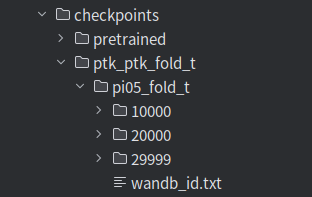
Training Output#
After training, the generated checkpoints have the following file structure:
Synchronous Inference#
Starting Inference#
1. Modify the Configuration File#
Before inference, open examples/airbot/robot_config.py and adjust the relevant parameters according to the actual task type:
⚠️ The examples below assume CAN interface names
can_left/can_right. Change them to the actual CAN device names on your system.
Task-type configuration:
- Dual-arm task: Keep the default configuration.
- Single-arm task: Change
robot_groupsto"left"androbot_interfaceto"can_left"; retain the camera names["base_0_rgb", "left_wrist_0_rgb"].
Camera configuration (all tasks):
- Change the
camera-indexparameter according to the actual camera indices. Supply them in this order: environment camera, left-arm camera, right-arm camera. See Querying Camera Devices. - Do not change the camera names
["base_0_rgb", "left_wrist_0_rgb", "right_wrist_0_rgb"]arbitrarily. If only two cameras are required, retain["base_0_rgb", "left_wrist_0_rgb"], consistent with training.
2. Run the Inference Command#
Single-arm task:
uv run examples/airbot/airbot_inference_sync_ah.py policy-config:local-policy-config \
    --policy-config.config-path data/1-1-example \
    --policy-config.checkpoint-dir checkpoints/1-1-example/9000
Dual-arm task:
uv run examples/airbot/airbot_inference_sync_ah.py policy-config:local-policy-config \
    --policy-config.config-path data/ptk_example \
    --policy-config.checkpoint-dir checkpoints/ptk_example/9000 \
Parameter descriptions:
| Parameter | Description | Precautions |
|---|---|---|
| robot_ports | Robot port numbers | Change according to the actual startup configuration |
| checkpoint-dir | Weight-file path | Change according to the actual path |
| camera-index | Camera indices | The order must be: environment camera → left-arm camera → right-arm camera |
| reset-action | Initial robot position | Refer to the initial teaching-arm position during data collection |
Caution
- Inference performance: With 24GB of video memory (RTX 4090), one inference takes approximately 110ms.
- First inference: A long execution time is normal.
- Dependency version: If a parameter-parsing error occurs, check whether the
tyroversion is 0.9.22.
Common Issue#
Description#
The following error occurs: jaxlib.xla_extension.XlaRuntimeError: UNIMPLEMENTED: /home/cytham/workspace/openpi/.venv/lib/python3.11/site-packages/nvidia/cuda_nvcc/bin/ptxas ptxas too old. Falling back to the driver to compile.
Solution#
 # First back up the old ptxas (optional but recommended)
  cd /home/cytham/workspace/openpi/.venv/lib/python3.11/site-packages/nvidia/cuda_nvcc/bin/
  mv ptxas ptxas.old_backup

  # Create a symbolic link to the system's new ptxas
  ln -sf /usr/local/cuda-12.9/bin/ptxas ptxas

  # Verify that the link was created successfully
  ls -l ptxas # It should show something similar to: ptxas -> /usr/local/cuda-12.9/bin/ptxas